> For the complete documentation index, see [llms.txt](https://help.parta.io/llms.txt). Markdown versions of documentation pages are available by appending `.md` to page URLs; this page is available as [Markdown](https://help.parta.io/no-code-editor/edit-elements/manage-and-customize-an-element.md).
# Manage and Customize an Element
Elements control options similar to the units [management](broken://pages/kzgnyyD0l2TAzakpz9Lf) and [customization](/no-code-editor/edit-units/customise-a-unit.md) options.
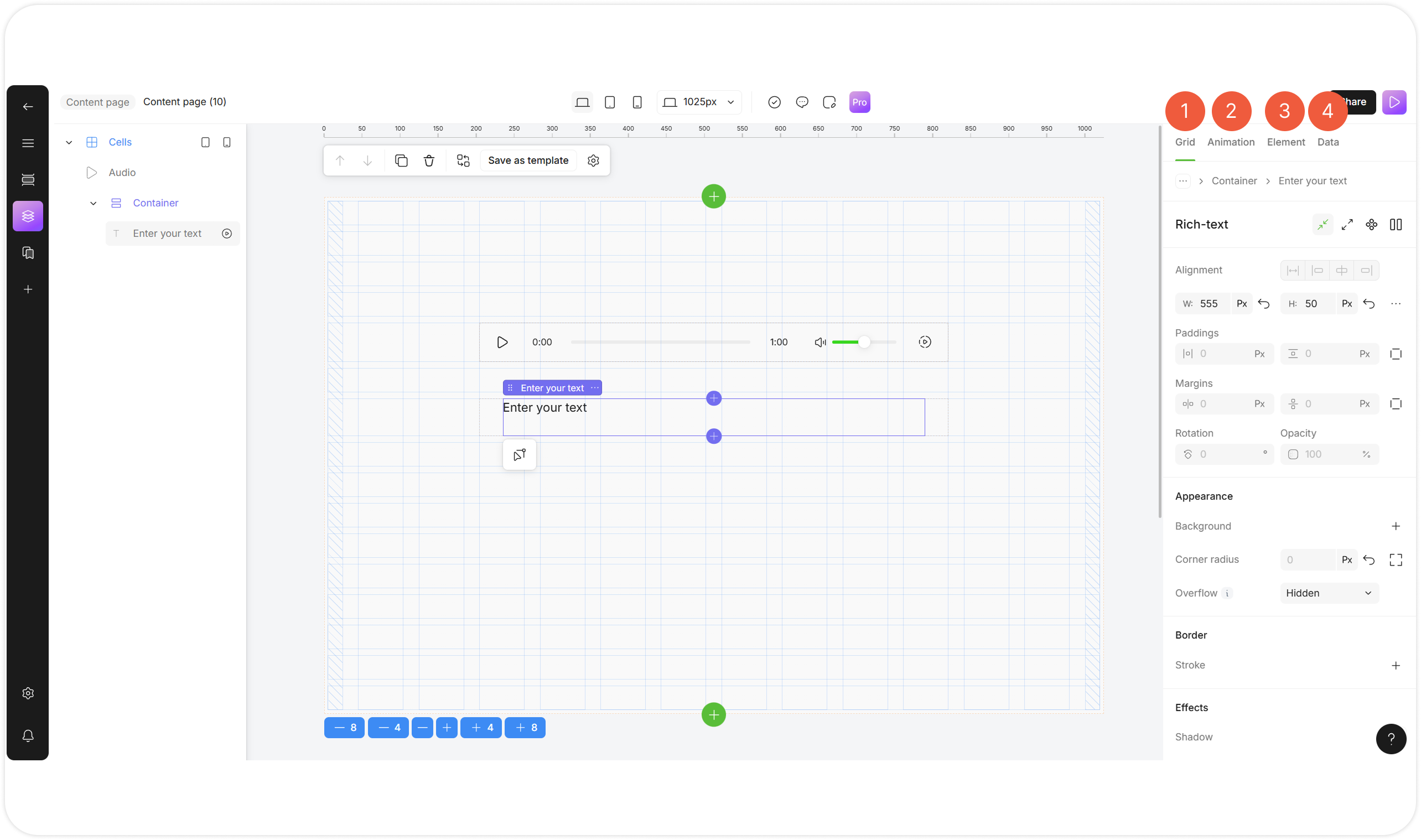
An element in Pro Mode has advanced settings divided into the following tabs:
{% stepper %}
{% step %}
Grid tab
The Grid tab allows you to [configure](/no-code-editor/edit-units.md) advanced element settings, such as the element's position and size.
{% endstep %}
{% step %}
Animation tab
The Animation tab allows you to [animate](/no-code-editor/edit-units/animate-a-unit.md) elements in single or multiple steps.
{% endstep %}
{% step %}
Element tab
The Element tab allows you to customize the specific element [branding settings](https://help.parta.io/~/changes/541/branding/introduction).
{% endstep %}
{% step %}
Data tab
The Data tab allows you to manage the element [data settings](https://help.parta.io/~/changes/541/editor/edit-elements).
{% endstep %}
{% endstepper %}