| - | - | Yes | - |
## **Rename a Section**

{% stepper %}
{% step %}
[Open a Project](/project/set-projects/manage-a-project.md) and go to the **Contents** tab.
{% endstep %}
{% step %}
Click on the section name to put a cursor in a name field.
{% endstep %}
{% step %}
Type the new name.
The changes will be saved automatically.
{% endstep %}
{% endstepper %}
## **Edit a Section**

{% stepper %}
{% step %}
[Open a Project](/project/set-projects/manage-a-project.md) and go to the **Contents** tab.
{% endstep %}
{% step %}
Click **Edit** next to the section.
An editor window of the specific section will appear.
{% endstep %}
{% endstepper %}
## **Duplicate a Section**

{% stepper %}
{% step %}
[Open a Project](/project/set-projects/manage-a-project.md) and go to the **Contents** tab.
{% endstep %}
{% step %}
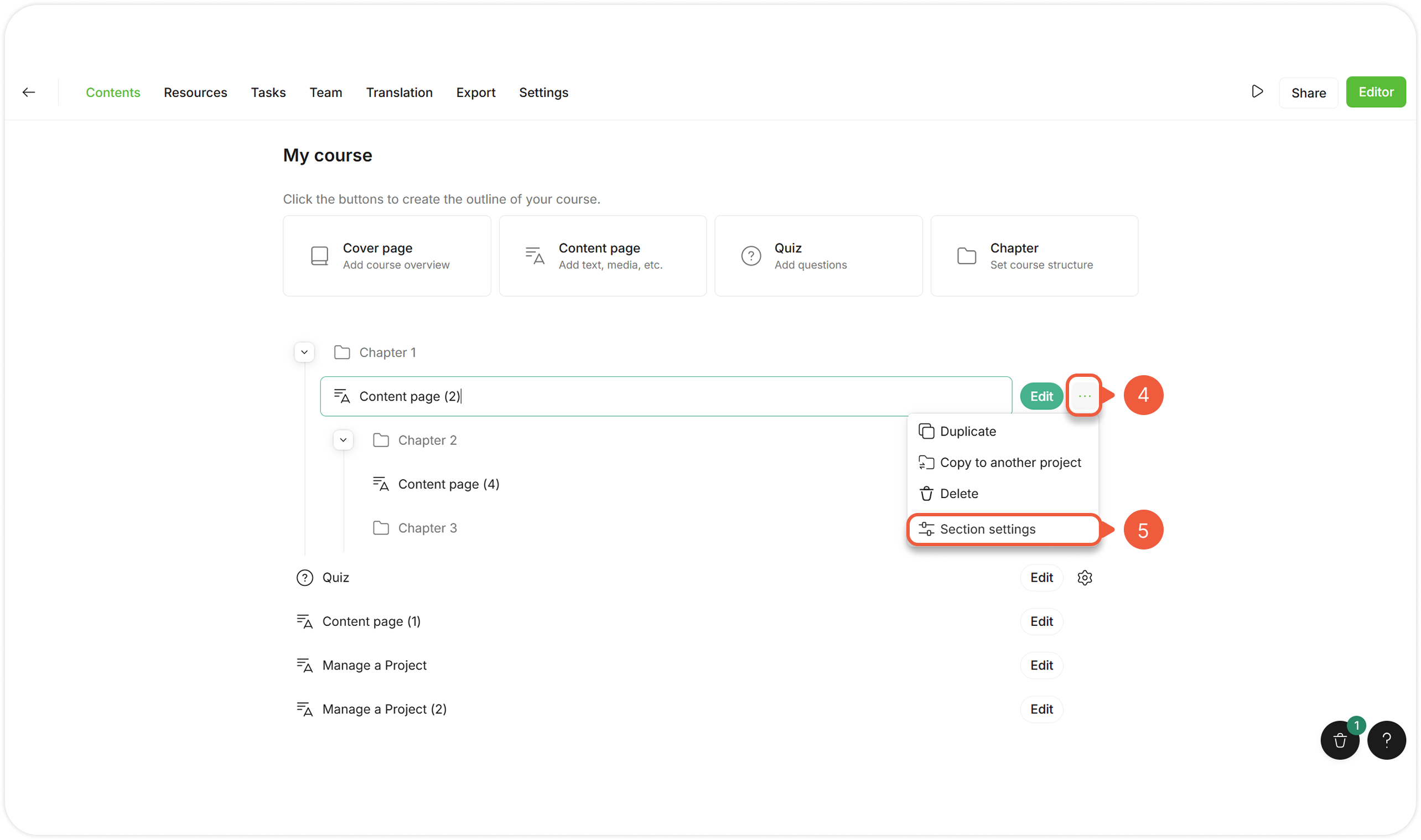
Hover over and click the **Settings** icon next to the section.
{% endstep %}
{% step %}
Select **Duplicate**.
The section copy will appear in the same Chapter / Project below the original section.
{% endstep %}
{% endstepper %}
{% hint style="warning" %}
If the copied section contains tasks and / or comments, they will not be copied along with the section.
{% endhint %}
## **Copy a Section to Another Project**

{% stepper %}
{% step %}
[Open a Project](/project/set-projects/manage-a-project.md) and go to the **Contents** tab.
{% endstep %}
{% step %}
Hover over and click the **Settings** icon next to the section.
{% endstep %}
{% step %}
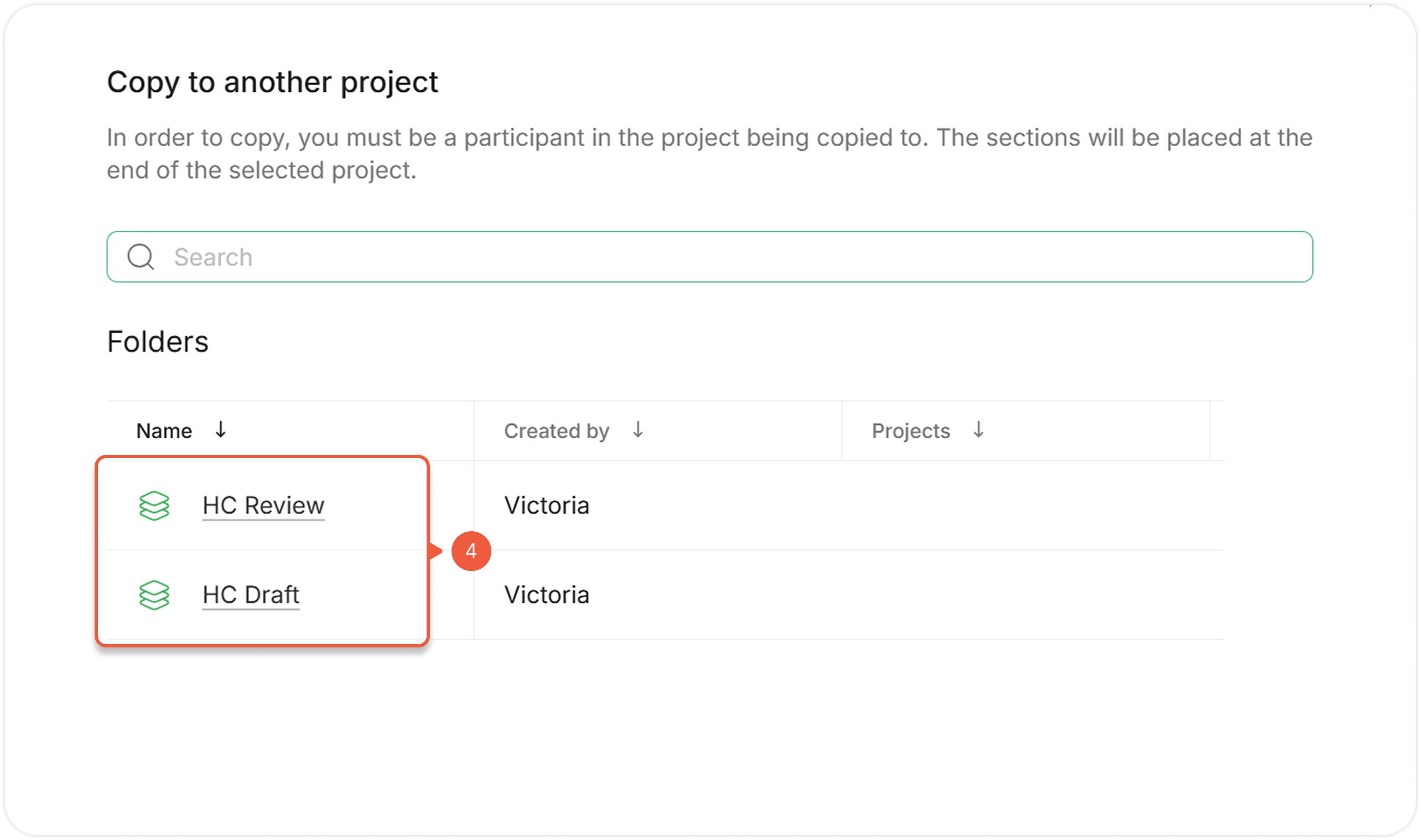
Select **Copy to another project**.
A pop-up window will appear.
{% endstep %}
{% step %}
Select a Project to insert a copied section.
* If the Project is **out of folders**, click on the Project name directly;
* If the Project is **in the folder**, click on the folder name to open a folder first.
The section copy will appear at the bottom of the selected Project.
{% endstep %}
{% endstepper %}
{% hint style="warning" %}
If the copied section contains tasks and / or comments, they will not be copied along with the section.
{% endhint %}
## **Delete a Section**

{% stepper %}
{% step %}
[Open a Project](/project/set-projects/manage-a-project.md) and go to the **Contents** tab.
{% endstep %}
{% step %}
Hover over and click the **Settings** icon next to the section.
{% endstep %}
{% step %}
Select **Delete**.
{% endstep %}
{% endstepper %}
{% hint style="success" %}
When deleting a Chapter, all nested sections of the Chapter will also be deleted.
{% endhint %}
{% hint style="success" %}
If the deleted section contains tasks and / or comments, they will be deleted along with the section.
{% endhint %}
## **Restore a Section**

{% stepper %}
{% step %}
[Open a Project](/project/set-projects/manage-a-project.md) and go to the **Contents** tab.
{% endstep %}
{% step %}
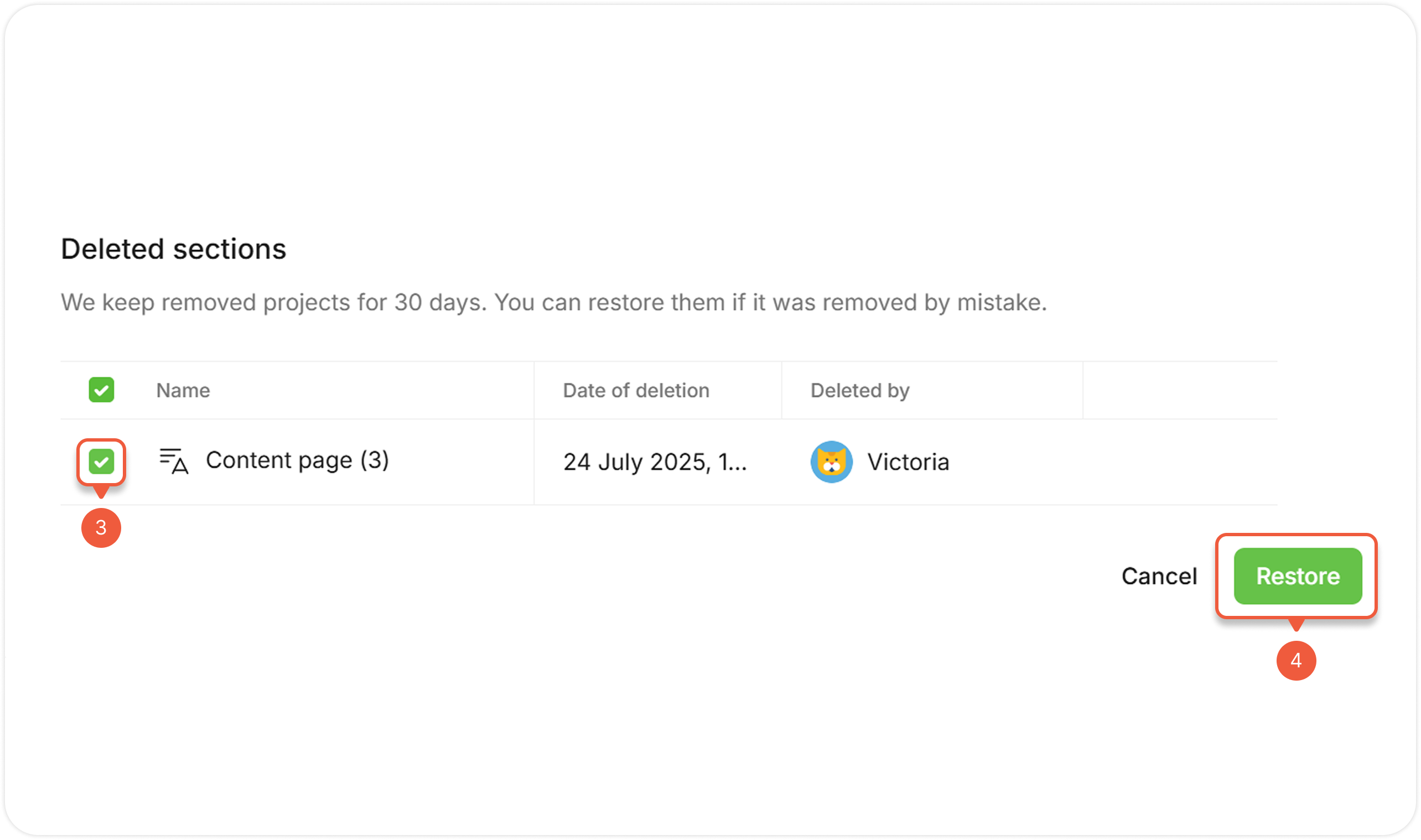
Click on the basket at the right bottom corner.
A pop-up window will appear.
{% endstep %}
{% step %}
Select the checkbox next to the section(s).
{% endstep %}
{% step %}
Click the **Restore** button.
The restored section will appear at the bottom of the Project.
{% endstep %}
{% endstepper %}
{% hint style="success" %}
When restoring a Chapter, all nested sections of the Chapter will also be restored.
{% endhint %}
{% hint style="success" %}
If the restored section contains tasks and / or comments, they will be restored along with the section.
{% endhint %}
## **Lock Section Editing**
Make sections non-editable. Locked sections are still available for viewing, but not changing.
{% hint style="success" %}
Non-editable sections are unable to delete / change quiz settings, but available for duplicating / copying to another project. Duplicated / copied sections will be editable.
{% endhint %}

{% stepper %}
{% step %}
[Open a Project](/project/set-projects/manage-a-project.md) and go to the **Contents** tab.
{% endstep %}
{% step %}
Hover over and click the **Settings** icon next to the section.
{% endstep %}
{% step %}
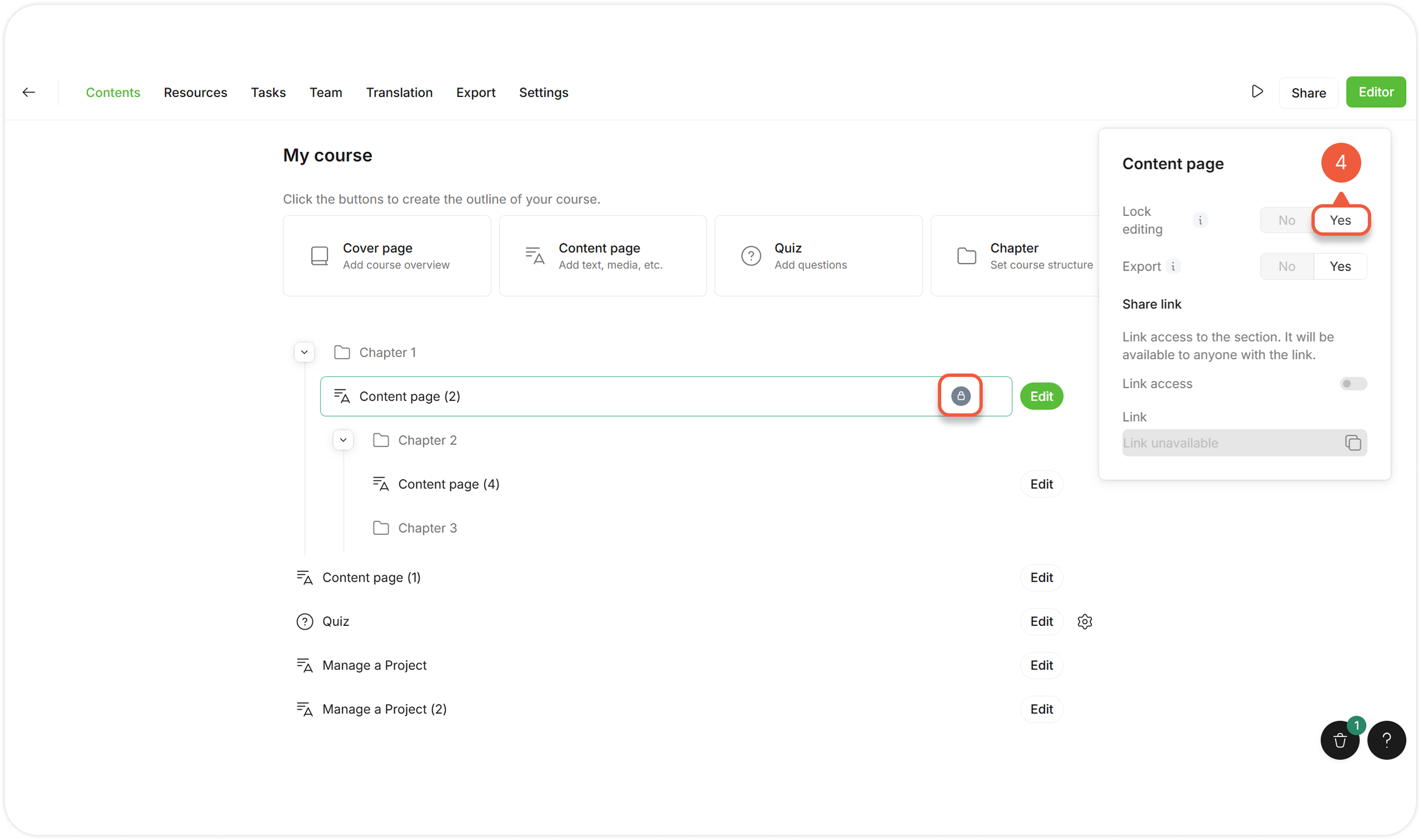
Select **Section settings**.
A pop-up window will appear.
{% endstep %}
{% step %}
Click **Yes** next to the **Lock editing** setting.
A lock icon will appear next to the section.
The changes will be saved automatically.
{% endstep %}
{% endstepper %}
## **Exclude a Section from Export**
Hide sections that are not relevant to certain users. Excluded materials won't appear in export or preview.
{% hint style="warning" %}
Excluded sections can't be shared.
{% endhint %}

{% stepper %}
{% step %}
[Open a Project](/project/set-projects/manage-a-project.md) and go to the **Contents** tab.
{% endstep %}
{% step %}
Hover over and click the **Settings** icon next to the section.
{% endstep %}
{% step %}
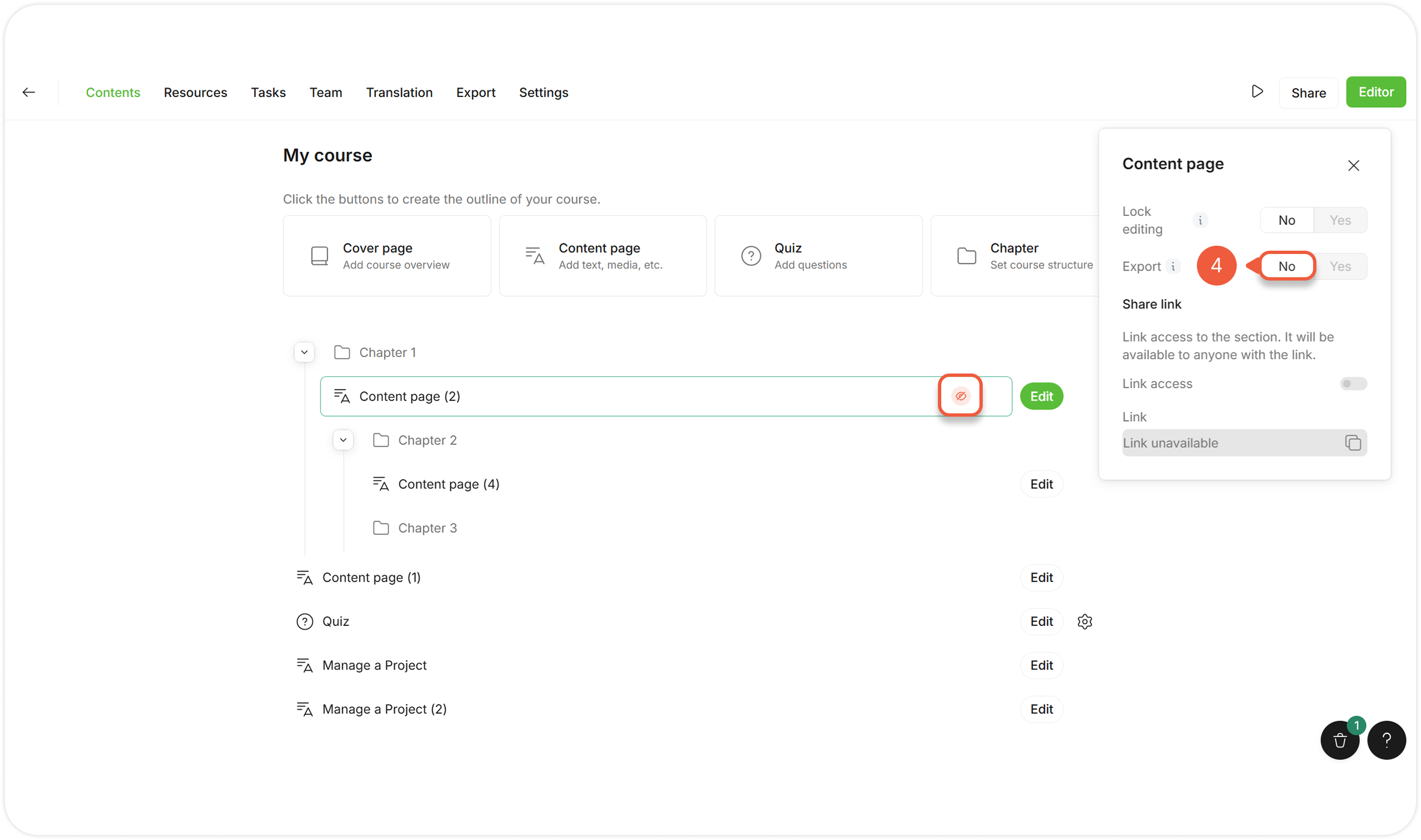
Select **Section settings**.
A pop-up window will appear.
{% endstep %}
{% step %}
Click **No** next to the **Export** setting.
An unable export icon will appear next to the section.
The changes will be saved automatically.
{% endstep %}
{% endstepper %}
## **Share a Section Link**
Public link allows any user to view the section without registering or logging in Parta.io.
{% hint style="success" %}
Disable access to restrict viewing of already published links.
{% endhint %}

{% stepper %}
{% step %}
[Open a Project](/project/set-projects/manage-a-project.md) and go to the **Contents** tab.
{% endstep %}
{% step %}
Click the **Share** button.
A pop-up window will appear.
{% endstep %}
{% step %}
Enable **Public link** toggle at the **View - Share course link** section.
{% endstep %}
{% step %}
Hover over and click the **Settings** icon next to the section.
{% endstep %}
{% step %}
Select **Section settings**.
A pop-up window will appear.
{% endstep %}
{% step %}
Enable **Link access** toggle at the **Share link** section.
{% endstep %}
{% step %}
Copy the generated section link.
A share icon will appear next to the project and section.
The changes will be saved automatically.
{% endstep %}
{% endstepper %}
## **Customize Additional Quiz Settings**
Additional settings are available for the **Quiz** section:
.png?alt=media\&token=e1f404e4-808b-421a-be44-d6d11adbc728)
{% stepper %}
{% step %}
[Open a Project](/project/set-projects/manage-a-project.md) and go to the **Contents** tab.
{% endstep %}
{% step %}
Click the **Quiz settings** icon next to the Quiz section.
A pop-up window will appear.
{% endstep %}
{% step %}
Set [**Quiz settings**](/project/set-sections/set-a-quiz/manage-a-quiz.md#edit-additional-quiz-settings) of a specific Quiz.
{% endstep %}
{% endstepper %}
The changes will be saved automatically.
## **Perform Bulk Actions**
[Lock editing](#lock-section-editing), [exclude from export](#exclude-a-section-from-export), [duplicate](#duplicate-a-section), [copy to another Project](#copy-a-section-to-another-project) or [delete](#delete-a-section) multiple sections at once.

{% stepper %}
{% step %}
[Open a Project](/project/set-projects/manage-a-project.md) and go to the **Contents** tab.
{% endstep %}
{% step %}
Select multiple sections:
* To select sections **within the Project / same Chapter**, press and hold **Shift** key and click on the sections;
* To select sections **of a Project or / and any Chapter**, press and hold **Ctrl** (or **Cmd** on Apple devices) and click on the sections;
* To select sections **grouped by a Chapter**, select the Chapter containing these nested sections.
A pop-up window will appear.
{% endstep %}
{% step %}
Select the required action from the action menu.
Actions for multiple sections work the same as actions for a single section.
{% endstep %}
{% endstepper %}