> For the complete documentation index, see [llms.txt](https://help.parta.io/llms.txt). Markdown versions of documentation pages are available by appending `.md` to page URLs; this page is available as [Markdown](https://help.parta.io/workspace/set-a-workspace/share-outside-company.md).
# Share outside company
### Share projects to another company
You can share projects with another company (account) by copying them.
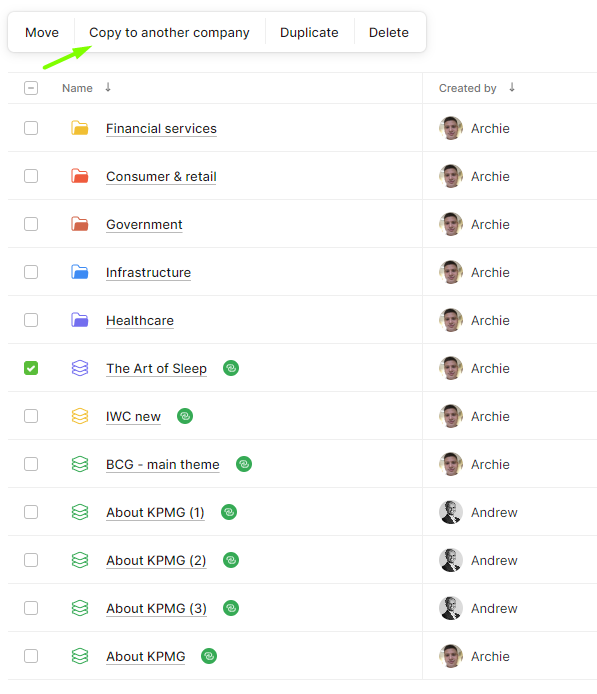
Just go to the **Projects page**, **select the project**, click on "**Copy to Another Company.**"
{% hint style="info" %}
To share a project with another company, you need the company's user ID.
{% endhint %}
You can find the user company's ID in the user account settings.
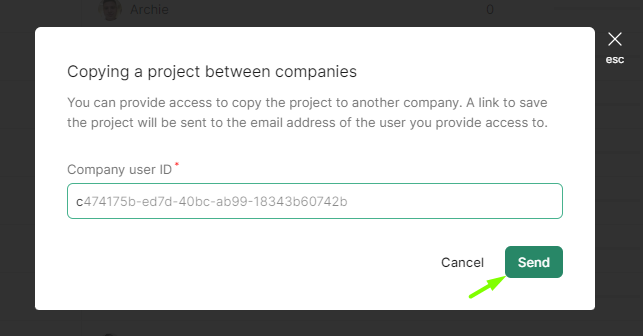
Type this ID in the pop-up window and click "**Send**." The user will get a notification and an email about the new course.
### Share branding styles
You can share branding styles too. Just go to **Branding** from the home screen, **select the style**, and click "**Export**."
{% hint style="info" %}
The selected style will be downloaded to your device as a .json file. You can then upload this file as a branding style to a different company account.
{% endhint %}
**To import**, open Branding page in the other company's account, click **"+ Add**," choose "**Import**," and a window will pop up. Here, you can upload the .json file and name the new branding style.
### Share Images
To share images, go to **Resources** from the home screen or in a project, **select files**, and click '**Download**.'